How to Customize WhatsApp Messages with Different Fonts and Styles


Did you know that you can customize your WhatsApp messages with different fonts and styles? This versatile messaging app lets you go beyond the basics and add a touch of creativity to your messages. Whether you want to emphasize a word or phrase, add emphasis or express emotion, or simply have some fun, there's a formatting trick for you.
In this article, we'll show you how to bold, italicize and cross out text in WhatsApp. We'll also provide some tips on how to use these formatting tricks to create more engaging and expressive messages.
How to change the font on WhatsApp?
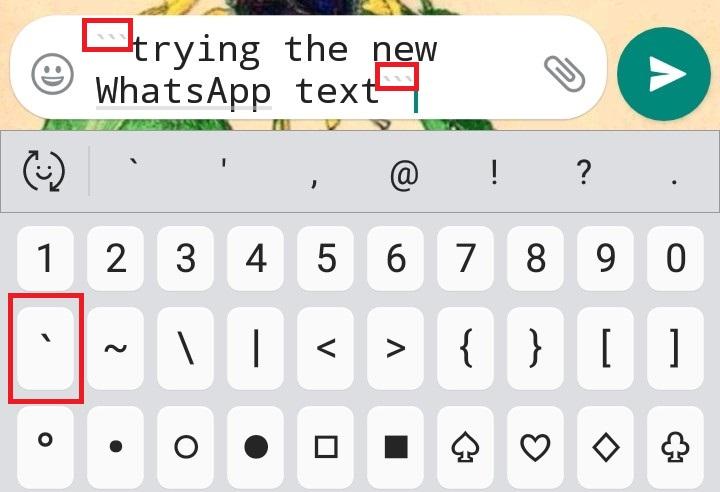
One of the coolest WhatsApp text tricks is the ability to change your font style to a retro typewriting style. Surprisingly, you don't need to download any third-party apps to do this. All you have to do is enclose your message between three sets of inverted single commas ('''). This simple trick can make your messages look distinctive and nostalgic, reminiscent of classic typewriters.
Here are the steps:
- Type your message.
- Place three inverted commas ('''') before and after your message. This will instantly transform the appearance of your text.
This feature is only available on Android devices. iPhone users will need to download a third-party keyboard app to use this feature. This limitation means Android users have a unique way to customize their chats without additional software.
Express your love in style with these romantic WhatsApp messages. Adding a personal touch with unique fonts can enhance the sentiment of your messages.
Experiment with different styles to see which one best suits your conversation!

How to make you WhatsApp stories and statuses more engaging
The new WhatsApp Status application is a great way to share your personal stories and express yourself creatively. With its wide range of features, you can create unique and engaging statuses that will capture the attention of your audience. Whether it's a simple text update or a multimedia story, you have the tools to make it memorable.
Here are some of the things you can do with WhatsApp Status:
- Share text, photos, and videos: you can share any type of content with your Status, including text, photos, and videos. This versatility allows you to convey your message in the most effective way possible.
- Use emojis and GIFs: emojis and GIFs are a great way to add personality and flair to your Statuses. They can help convey emotions and reactions that words alone might not.
- Customize the font and color of your text: you can choose from a variety of fonts and colors to make your Statuses stand out. Customizing your text can make your status more visually appealing and unique.
- Add a caption: you can add a caption to your Statuses to provide more context or to share your thoughts and feelings. Captions can engage your friends by giving them more insight into your updates.
To upload a WhatsApp Status, simply follow these steps:
- Open the WhatsApp app.
- Tap the Status tab.
- Tap the pencil icon at the bottom right to compose your Status.
- To capture a photo, use the camera icon below. This feature allows you to share spontaneous moments instantly.
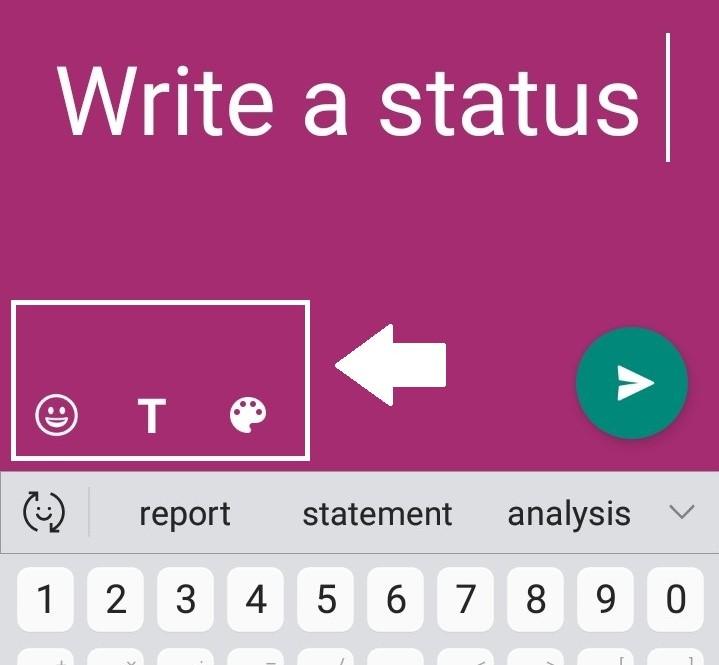
If you choose the pencil icon, you'll discover three options at the bottom left:
- Click the smiley face for emojis. These can add a fun and relatable element to your text.
- Tap T to switch up your font. Changing fonts can give your status a distinctive look and feel.
- Click the paint palette to experiment with colors. Different colors can evoke different moods and enhance the theme of your status.
Once you're finished, tap the Send button to share your Status. Engaging statuses can keep your friends and family updated on your life in a creative way.
Keep your private conversations private with this simple trick. Ensuring your privacy can make your WhatsApp experience more secure and enjoyable.

How to bold, italicize, and strikethrough text in WhatsApp
Wondering how to make your WhatsApp messages stand out? Here are a few nifty formatting tricks you can use to add some flair to your messages. These tricks can make your messaging more dynamic and expressive, allowing you to communicate more effectively.
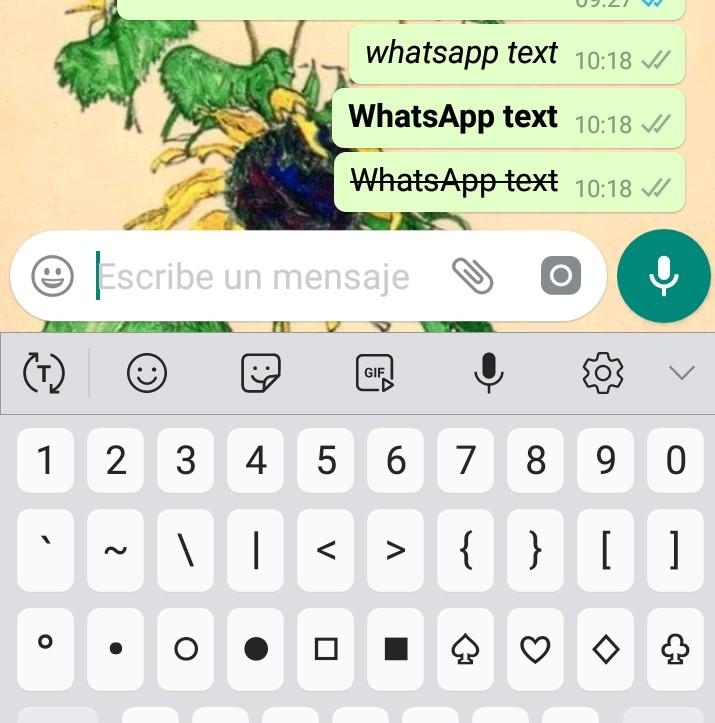
- Bold text: to bold text in WhatsApp, simply enclose the text you want to highlight in asterisks (*) - like this: text you want in bold. This can help draw attention to important parts of your message.
- Italicize text: to italicize text in WhatsApp, use underscores (_) around the text - for example: text I want in italics. Italics can be useful for emphasizing a point or conveying a softer tone.
- Strikethrough text: if you want to cross out words or phrases on WhatsApp, place a tilde (~) before and after the text you want to strike through - like this: ~text that I want to cross out~. This can be a playful way to show humor or indicate a change in plans.
You can also combine these formatting tricks to create even more unique and expressive messages. For example, you could bold and italicize a word to emphasize it even more, or strikethrough something to indicate that you're joking. Experimenting with these combinations can lead to creative and impactful communication.
So have fun and experiment with these formatting tricks to make your WhatsApp messages more unique and engaging. Personalized messages can enhance the way you interact with friends and family.
Don't panic if you've deleted an important WhatsApp chat! Here's how to recover it. Recovering lost messages can save you from potential misunderstandings or loss of important information.
Remember, the key to effective communication is creativity and clarity!

If you want to read similar articles to How to Customize WhatsApp Messages with Different Fonts and Styles, we recommend you visit our Internet category.